Data Matching Example
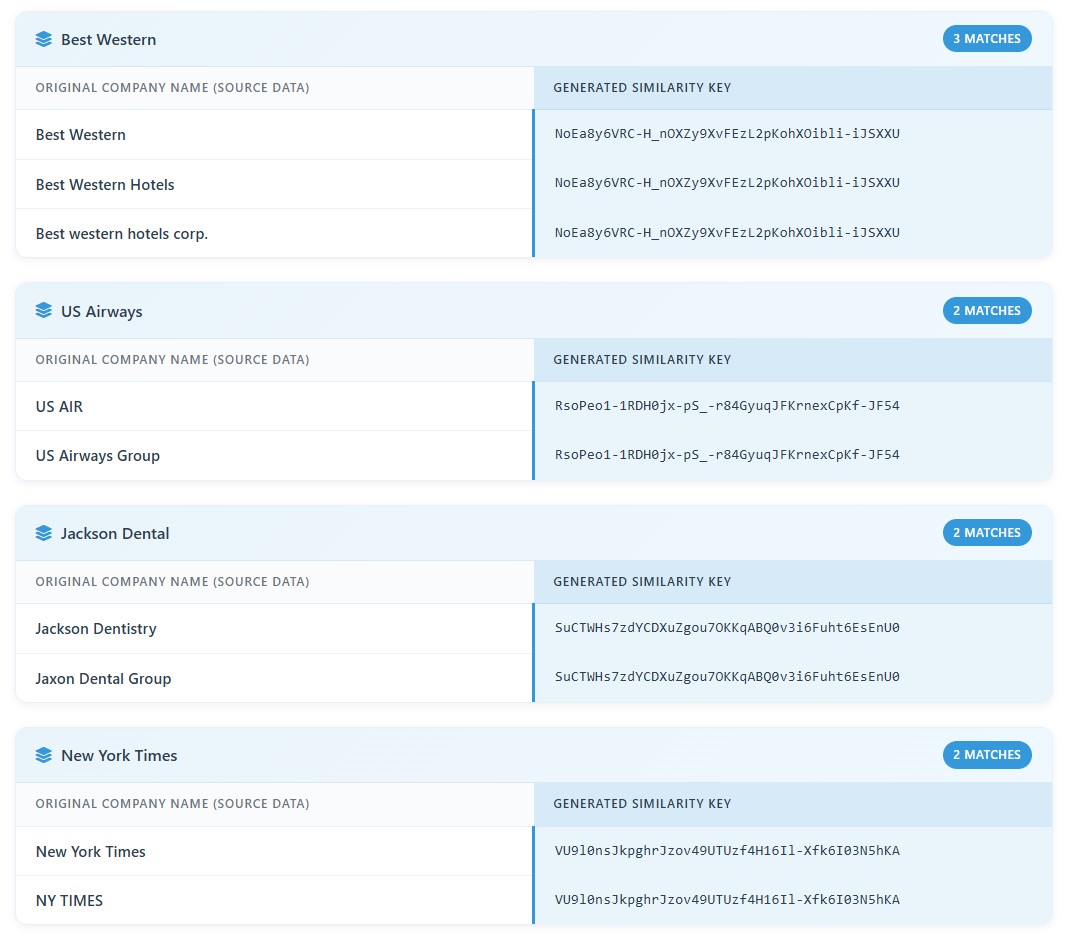
See our Azure SQL batch processing in action - generating similarity keys to match company/organization name data from directly within Azure SQL tables.
Match organization names, individual names, addresses, and general text across entire Azure SQL tables
Lightning-fast parallel processing with AI-powered similarity matching, directly inside your database
Leverage our high-performance, parallel-processing cloud architecture to run AI-driven matching jobs against entire Azure SQL tables or views, finding the duplicate and near-duplicate records that exact matching cannot.
Interzoid connects using standard SQL Server credentials or a connection string, so it reads from Azure SQL, managed cloud services, and self-managed SQL Server instances alike.
No connector to install and nothing to deploy inside your environment. If your platform accepts a standard SQL Server connection string, Interzoid can read from it, including the connection string the Azure portal provides.
Seamlessly process Azure SQL tables or views with direct, read-only database connectivity, including dedicated read-only roles, and optimized performance for cloud databases.
Learn MoreAdvanced algorithms and AI models identify similar data elements, generate similarity keys for clustering matches and detecting inconsistencies within and across your data tables.
Learn MoreMulti-threaded, high-performance architecture processes high volumes of data in seconds using our distributed cloud infrastructure.
Learn MoreGet started in minutes with our streamlined three-step process
Connect directly to your Azure SQL database tables using connection fields or a standard connection string, with a read-only role recommended.
Choose the algorithm that fits your data: organization names, individual names, addresses, general text, or a combination of two of them at once.
Receive a match report with records grouped into clusters by similarity key, ready to review, share, or import back into your Azure SQL tables.
See our Azure SQL batch processing in action - generating similarity keys to match company/organization name data from directly within Azure SQL tables.
Four data types, plus combinations that raise precision when one field alone is too broad
Resolve Acme Corp, ACME Corporation, and Acme Inc. to a single organization, across the legal suffixes, punctuation, abbreviations, and spelling variations that make company names so inconsistent.
Match James Johnston, Jim Johnston, and J. Johnston as the same person, handling nicknames, initials, middle names, and name ordering.
Reconcile 400 E Broadway St with 400 East Broadway Street, resolving directional abbreviations, street type variations, unit designations, and spacing.
Generate similarity keys for other text values, so product names, descriptions, and free-form fields cluster the same way that names and addresses do.
Require two fields to agree at once: organization with address, organization with individual name, or address with individual name. This separates the Dallas branch from the Phoenix branch while still recognizing that both spell the parent company four different ways.
Every value receives a key representing the entity behind the text rather than the characters themselves. Records sharing a key are grouped into clusters, which makes each match auditable instead of something to take on faith.
Any Azure SQL or SQL Server instance reachable over the network. That includes Azure SQL Database, Azure SQL Managed Instance, SQL Server on Azure VMs, Amazon RDS for SQL Server, Google Cloud SQL for SQL Server, and self-managed SQL Server 2016 and later on Windows or Linux. If the platform accepts a standard SQL Server connection string, Interzoid can read from it.
No. Processing issues SELECT statements against the table and columns you choose and nothing else. Nothing is written, updated, or deleted, and no schema objects are created. Results are returned to your browser, and you decide what to do with them.
No. Interzoid connects directly to your Azure SQL database and reads the columns you select. There is no CSV export, no staging area, and no copy of your data to secure, track, or delete afterward.
Credentials are transmitted over HTTPS with each request and are not retained after the session ends. Connections use TLS by default. Because processing is read-only, the recommended practice is to connect with a dedicated read-only role that can be revoked at any time.
Each record processed consumes one Interzoid API credit. Trial credits are included with a new API account, so a first table can be processed at no cost, and high volume tables are supported for production workloads.
Yes. The same processing is available as a REST API that can be called from scripts, applications, and data pipelines, which allows Azure SQL matching jobs to be automated without using the browser wizard.
Documentation, background reading, and the rest of the Interzoid platform
Join hundreds of data teams already using Interzoid's batch processing APIs
Questions? Contact our team at support@interzoid.com