Identify inconsistent, matching, and duplicate data across your Snowflake tables in just a few clicks.
A guided, read-only analysis tool that turns better data quality into better Snowflake ROI.
The Snowflake Matching Wizard connects directly to your Snowflake data tables in read-only analysis mode. In a guided, step-by-step flow, you'll generate AI-enhanced match reports that surface inconsistent values, redundant records, and duplicate entries across any number of Snowflake data assets. Parallel processing delivers maximum performance, even on large tables.
A quick look at the Matching Wizard experience, from connecting to Snowflake through reviewing your match report.
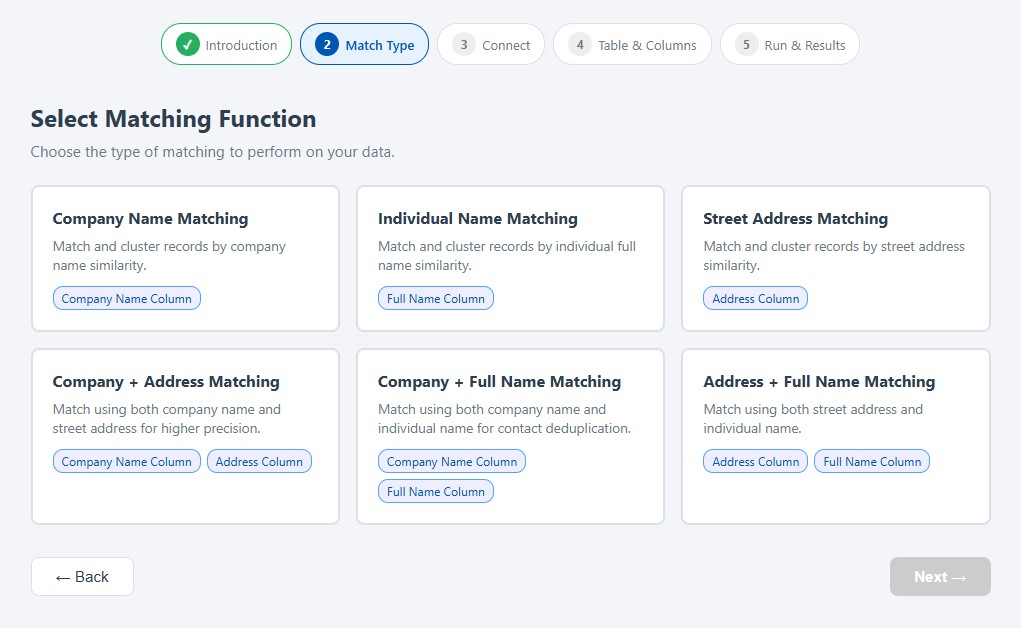
Select the type of matching you want to perform: company names, individuals, addresses, and more.
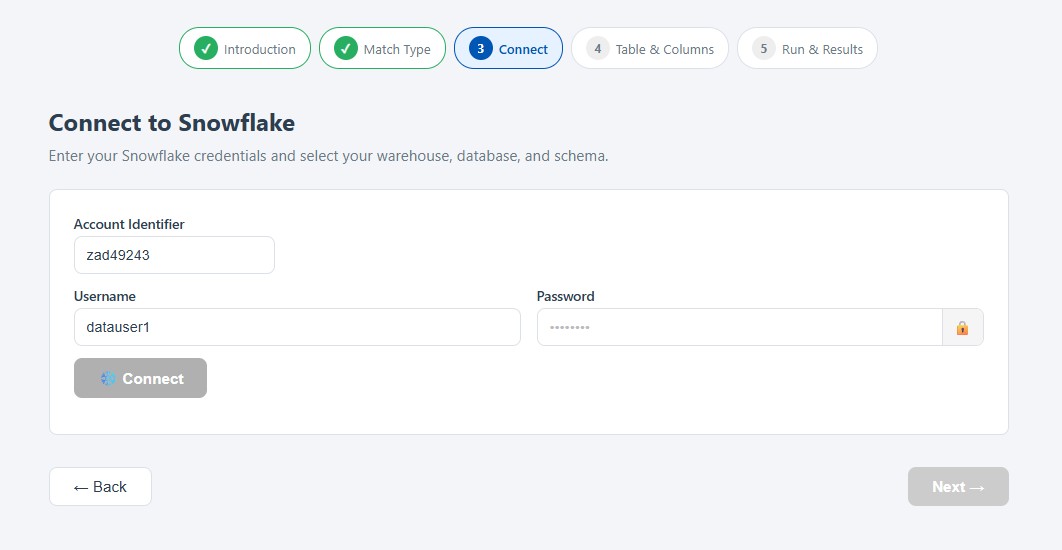
Securely connect to your Snowflake account in read-only mode.
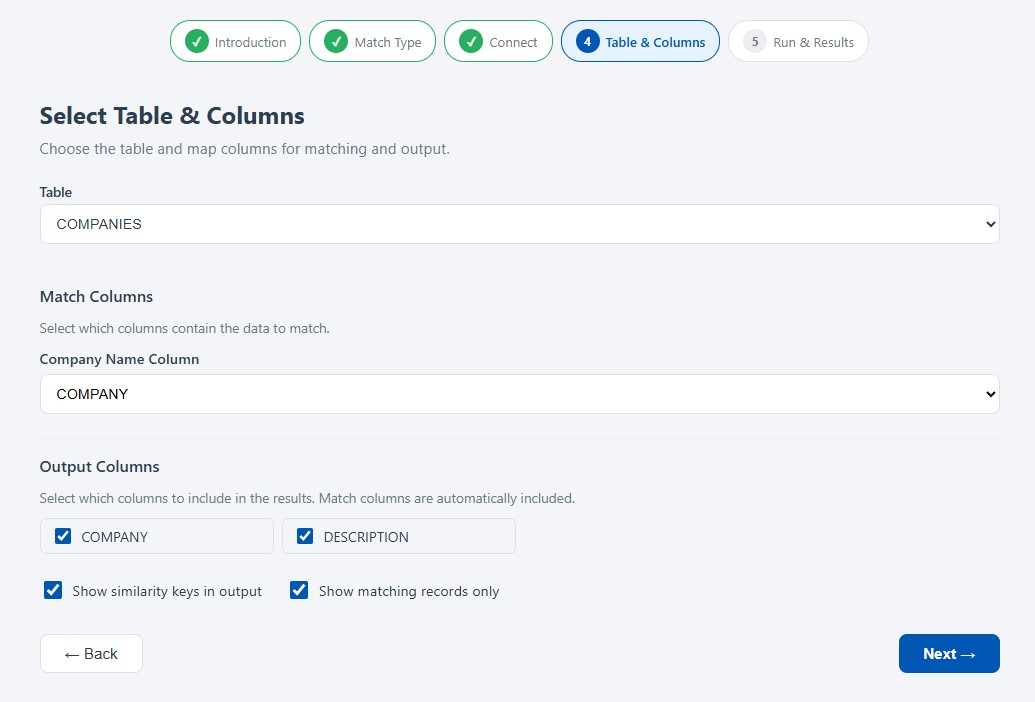
Choose the Snowflake tables and columns containing the data you want to analyze.
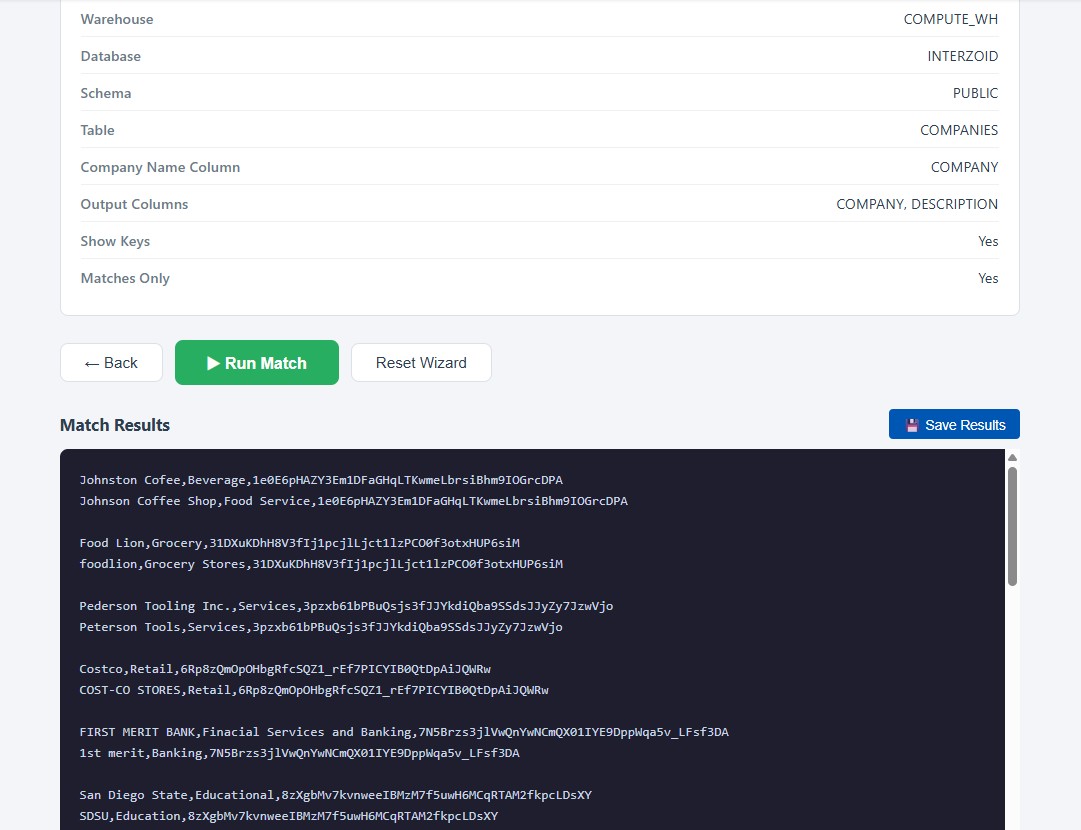
Run the job and review your match report, with clusters of matching, duplicate, and inconsistent records.
A guided wizard walks you through connecting to Snowflake, choosing your data, and generating a match report. No SQL or scripting required.
The wizard operates entirely in read-only analysis mode. Your Snowflake data is never modified, making it safe to run against any of your tables.
Advanced AI-enhanced similarity algorithms cluster matching records and reveal duplicates and inconsistencies that exact-match queries miss entirely.
Cleaner data means more reliable analytics, better customer insights, and fewer wasted compute cycles processing redundant records.
A multi-threaded, distributed cloud architecture processes large Snowflake tables in parallel, delivering match reports fast, even at high data volumes.
Receive clear, organized reports that highlight clusters of similar records, ready to drive deduplication and consolidation decisions.
From connection to match report in three simple steps.
Connect directly to your Snowflake database. Snowflake Reader Accounts are fully supported and recommended for read-only access.
Choose the Snowflake tables and columns containing the data you want to analyze for matches, duplicates, and inconsistencies.
Run the matching job and review a clear, AI-enhanced report identifying clusters of matching, duplicate, and inconsistent records.
Everything you need to get started, from a sample report to a step-by-step video walkthrough.
See an example match report for company name data, showing how matching clusters are presented.
View Sample ReportRead the complete documentation covering setup, connection, and matching options.
Read the DocsWatch a step-by-step YouTube walkthrough of the Snowflake Matching Wizard from start to finish.
Watch on YouTubeThe wizard connects with standard Snowflake credentials, so it reads from any account on any cloud, in any region, on any edition.
No connector to install, no integration to deploy, and nothing running inside your Snowflake account. Point the wizard at a warehouse, database, schema, and table, and it reads only the columns you select.
Four data types, plus combinations that raise precision when one field alone is too broad
Resolve Acme Corp, ACME Corporation, and Acme Inc. to a single organization, across the legal suffixes, punctuation, abbreviations, and spelling variations that make company names so inconsistent.
Match James Johnston, Jim Johnston, and J. Johnston as the same person, handling nicknames, initials, middle names, and name ordering.
Reconcile 400 E Broadway St with 400 East Broadway Street, resolving directional abbreviations, street type variations, unit designations, and spacing.
Generate similarity keys for other text values, so product names, descriptions, and free-form fields cluster the same way that names and addresses do.
Require two fields to agree at once: organization with address, organization with individual name, or address with individual name. This separates the Dallas branch from the Phoenix branch while still recognizing that both spell the parent company four different ways.
Every value receives a key representing the entity behind the text rather than the characters themselves. Records sharing a key are grouped into clusters, which makes each match auditable instead of something to take on faith.
All of them. Snowflake accounts hosted on AWS, Azure, or Google Cloud are supported in any region, across every Snowflake edition, using any warehouse size. Tables, views, and shared databases can all be matched, and Reader Accounts are supported for sharing only the data you choose.
No. Processing issues SELECT statements against the table and columns you choose and nothing else. Nothing is written, updated, or deleted, and no schema objects are created. Results are returned to your browser, and you decide what to do with them.
No. Interzoid connects directly to your Snowflake account and reads the columns you select. There is no CSV export, no staging area, and no copy of your data to secure, track, or delete afterward.
Credentials are transmitted over HTTPS with each request and are not retained after the session ends. Because processing is read-only, the recommended practice is to use a Snowflake Reader Account or a dedicated read-only role, either of which can be revoked at any time.
Each record processed consumes one Interzoid API credit. Trial credits are included with a new API account, so a first table can be matched at no cost, and high volume tables are supported for production workloads.
Yes. The same processing is available as a REST API that can be called from scripts, applications, and data pipelines, which allows Snowflake matching jobs to be automated without using the browser wizard.
Generate your first match report in minutes. No installation, no code, no changes to your data.
Questions? Contact our team at support@interzoid.com